A React Gantt benchmark for scheduling correctness
We strive to keep posts updated, but code samples may sometimes be outdated. Humans, see the Bryntum documentation; agents, https://mcp.bryntum.com for the latest info.
If you’re using a React Gantt to plan large projects, it has to do more than draw bars and dependency lines. When you move a task, the Gantt has to recalculate the position of every dependent task, taking into account each task’s calendars and constraints. A Gantt that only draws the lines gives you a plan that looks right but is wrong.
SVAR recently published a React Gantt benchmark that tested raw rendering speed. SVAR’s Gantt was the fastest, but they benchmarked their open-source Gantt, which has no scheduling engine, against several Gantts that do.
You can see the difference scheduling makes when you update a task with dependencies:
Bryntum’s React Gantt has scheduling on by default, so dragging a task with dependencies automatically moves every successor. The SVAR React Gantt Pro does not have scheduling enabled by default; its dependency line is decorative.
Rendering is cheaper when you don’t build the dependency graph that a scheduling engine uses to verify the schedule and recalculate it on every change. When we re-ran SVAR’s loading benchmark with scheduling enabled in SVAR Pro, it crashed above ~4,500 tasks with Maximum call stack size exceeded from inside its own bundle.
We built a benchmark focused on scheduling correctness: fourteen scenarios, each isolating one scheduling feature. When we ran them, the React Bryntum Gantt scored 14/14, the SVAR React Gantt Pro scored 4/14.
Bryntum React Gantt vs. SVAR React Gantt feature comparison
The Bryntum React Gantt is a production-grade Gantt component built with a full scheduling engine: dependencies, constraints, working-time calendars, critical paths, resource allocation, and effort-driven scheduling. It is more feature-rich than the SVAR React Gantt as you can see in this feature comparison table:
| Feature | Bryntum Gantt | SVAR Free | SVAR Pro |
|---|---|---|---|
| Scheduling engine | |||
| Dependencies | All four link types scheduled | Drawn but not scheduled | FS links only |
| Critical path | criticalPaths feature, handles 10,000 tasks | ✗ | criticalPath strict/flexible modes; crashes above ~4,500 tasks under auto-schedule |
| Working-time calendars | Project + task + resource levels; specific working-hour intervals (e.g., 09:00–13:00, 14:00–18:00); any duration unit | ✗ | Named calendars for tasks and resources; total hours-per-day, no specific intervals; calendar duration unit limited to "day"; resource calendars don’t affect task dates |
| Constraints | ✓ | ✗ | ✗ |
| Scheduling modes | 4 modes: normal, fixed-duration, fixed-effort, fixed-units | ✗ | Single behavior (forward propagation on duration / dependency change) |
| Scheduling-conflict handling | Conflict popup; postponable conflicts via allowPostponedConflicts / autoPostponeConflicts | ✗ | Silently prevents invalid links (circular, summary-to-child); no user notification |
| Effort tracking | Effort and Actual Effort on task, resource, and assignment levels (effort separate from duration) | ✗ | ✗ |
| Inactive tasks | ✓ (excluded from scheduling, kept in the plan) | ✗ | ✗ |
| Time-phased assignments | Assignments with their own start/end dates and effort within a task | ✗ | ✗ |
| Cost calculations | Calculated on assignment, resource, task, and project levels; rate tables for resources | ✗ | ✗ |
| Resource types | Work, Material, and Cost resources | ✗ | ✗ |
| Timezones | ✓ | ✗ | ✗ |
| Baselines | ✓ | ✗ | ✓ |
| Resource assignment | Assignment picker + per-resource calendars that affect task scheduling | ✗ | Assignment picker + allocation %; drives the resource-load view, not task scheduling |
| Resource histogram & utilization views | ✓ | ✗ | Resource-load grid |
| Interactive editing | |||
| Task editor | Multi-tab editor with advanced fields | basic form | basic form |
| Calendar editor | Built-in UI for editing working-time calendars | ✗ | ✗ |
| Drag-to-create dependencies | Drag from task to task | ✗ | Click-based; drag-to-create not supported |
| Keyboard accessibility | Add / edit / delete via keyboard | ✗ | ✗ |
| Performance & scale | |||
| Lazy / virtualized loading | Not supported on Gantt (engine needs full dataset for scheduling) | ✓ | ✓ |
| Data I/O & extras | |||
| PDF / PNG / Excel export | ✓ | ✗ | ✓ |
| ICS export | ✓ | ✗ | ✗ |
| Built-in backend sync | Per-store AjaxStore (readUrl/createUrl/updateUrl/deleteUrl + load/commit) plus project-level CrudManager (loadUrl/syncUrl) | ✓ | ✓ |
| Localization (i18n) | ✓ | ✗ | ✗ |
| Split tasks, markers | ✓ | ✗ | ✓ |
| S-curve, charts integration | ✓ | ✗ | ✗ |
The scheduling capability benchmark focuses on dependency types, constraint modes, calendars, effort-driven scheduling, and inactive tasks.
Scheduling features comparison benchmark
The benchmark code, which you can find in our React Gantt scheduling benchmark GitHub repository, has a Bryntum React Gantt app and SVAR React Gantt Pro app. Each app has a dropdown menu in the header that enables selecting one of 14 scheduling scenarios. The capability scenarios cover dependency types (1–4), constraints (5–6), calendars (7, 8, 12), backward scheduling (9), critical path (10), conflict handling (11), effort-driven scheduling (13), and inactive tasks (14):
| # | Scenario | What the test isolates | Bryntum | SVAR Pro |
|---|---|---|---|---|
| 1 | SS dependency | Whether Start-to-Start propagation (dependency between start of predecessor task and start of successor task) moves the successor start | ✓ | ✗ |
| 2 | FF dependency | Whether Finish-to-Finish propagation keeps successor finish aligned | ✓ | ✗ |
| 3 | SF dependency | Whether Start-to-Finish propagation moves the successor finish | ✓ | ✗ |
| 4 | FS with lag | Whether a positive lag on an FS link propagates to the successor | ✓ | ✓ |
| 5 | Must Start On | Whether a hard date constraint survives incoming dependency pressure | ✓ | ✗ |
| 6 | Start No Earlier Than | Whether a soft floor date constrains the calculated start | ✓ | ✗ |
| 7 | Weekend calendar | Whether project-level working time skips weekends | ✓ | ✓ |
| 8 | Resource calendar | Whether resource availability changes task duration | ✓ | ✗ |
| 9 | Backward scheduling | Whether a chain can be placed ALAP from a deadline | ✓ | ✗ |
| 10 | Critical path | Whether the longest dependency chain is highlighted | ✓ | ✓ |
| 11 | Conflict handling | Whether invalid/cyclic links are surfaced or silently removed | ✓ | ✓ |
| 12 | Lunch-break calendar | Whether exact intra-day working intervals are modeled | ✓ | ✗ |
| 13 | Effort-driven scheduling | Whether effort plus resource assignment recalculates duration | ✓ | ✗ |
| 14 | Inactive tasks | Whether a task can be excluded from scheduling while keeping its place in the plan | ✓ | ✗ |
Final scores: Bryntum 14/14, SVAR Pro 4/14. SVAR React Gantt Pro has three dependency types that it can draw but does not schedule (SS, FF, SF), resource calendars that shade its load view without rescheduling tasks, and lacks six capabilities that the Bryntum React Gantt has.
The Bryntum Gantt has scheduling enabled by default; we enabled scheduling for SVAR Pro by setting schedule={{ auto: true }}.
We enabled the Bryntum Gantt’s date-pinning behavior to keep loaded dates and user drag edits pinned so each scenario tests dependency propagation, not Bryntum’s default ASAP rescheduling:
project : {
    autoSetConstraints     : true,
    addConstraintOnDateSet : true,
}
Bryntum’s scheduler treats tasks without constraints as auto-scheduled work. If a task has no dependency or constraint holding it in place, the scheduling engine moves it to the earliest valid date.
The autoSetConstraints property pins loaded dates for tasks that would otherwise be unconstrained. The addConstraintOnDateSet property pins a user’s date edit or drag action. These flags keep the predecessor where the user put it, which simplifies understanding the scheduling.
SS (Start-to-Start) dependency
A Start-to-Start link means the succeeding task should not start earlier than the start of the preceding task. When the predecessor begins, the successor should begin. We set up two tasks linked SS and moved the predecessor three days later:
Bryntum’s engine picks up the SS relationship and shifts the successor’s start by three days. SVAR Pro can store and display an SS link visually, but its auto-scheduler only propagates end-to-start (e2s) dependencies: the link line appears, but the successor’s start doesn’t move.
FF (Finish-to-Finish) dependency
A Finish-to-Finish link means the succeeding task cannot finish before the completion of the preceding task. We linked two tasks FF and extended the predecessor’s end date by one day:
Bryntum applied the propagation and the successor’s finish moved with it. SVAR Pro can store and display an FF link, but its auto-scheduler only propagates FS dependencies: the link draws, but the finish dates don’t stay together.
SF (Start-to-Finish) dependency
A Start-to-Finish link means the succeeding task’s completion is constrained by the start of the preceding task. The predecessor’s start drives the successor’s finish. It models just-in-time handoffs where a successor task can’t end until a predecessor task begins. We set one up and moved the predecessor’s start:
Bryntum propagated correctly: the predecessor’s start date changed the successor’s finish date. SVAR Pro’s auto-scheduler does not propagate this link type, so the predecessor’s moved start does not change the successor’s finish.
FS with lag
A dependency can have a lag value that delays the succeeding task by the number of lag units specified. FS with lag is supported by both Bryntum Gantt and SVAR Gantt: both let you set a positive or negative lag on an FS link. We set up an FS link with a 3-day positive lag and moved the predecessor earlier:
Both engines propagate the lag the same way in this case. Integration is scheduled as early as its dependencies allow, so dragging API foundation two working days earlier moves Integration two working days earlier as well, and both products land on the same date. FS is the one link type SVAR Pro’s auto-scheduler propagates (finish-to-start, e2s), and the lag moves with it.
Must Start On constraint
A Must Start On constraint pins a task to a specific date regardless of incoming dependencies. We pinned a task to August 12, then extended its predecessor so that strict dependency propagation would push the task past August 12:
Bryntum’s scheduling engine respects the constraint, holds the pinned date, and displays a scheduling-conflict popup when the constraint and the dependency disagree. The popup explains the clash (the Must Start On August 12 constraint on “Board review” conflicts with the Finish-to-Start dependency from “Content package”) and offers four resolutions:
- remove the constraint
- deactivate the dependency
- remove the dependency
- cancel the change (more on conflict handling in scenario 11).
SVAR Pro has no constraint primitive at all, so the task moves with the predecessor.
This constraint is good for milestones such as board reviews, regulatory submissions, and fixed event dates.
Start No Earlier Than constraint
A Start No Earlier Than constraint sets a floor on when a task can start. We applied a Start No Earlier Than floor of August 12 to a task whose predecessor finishes earlier in the month:
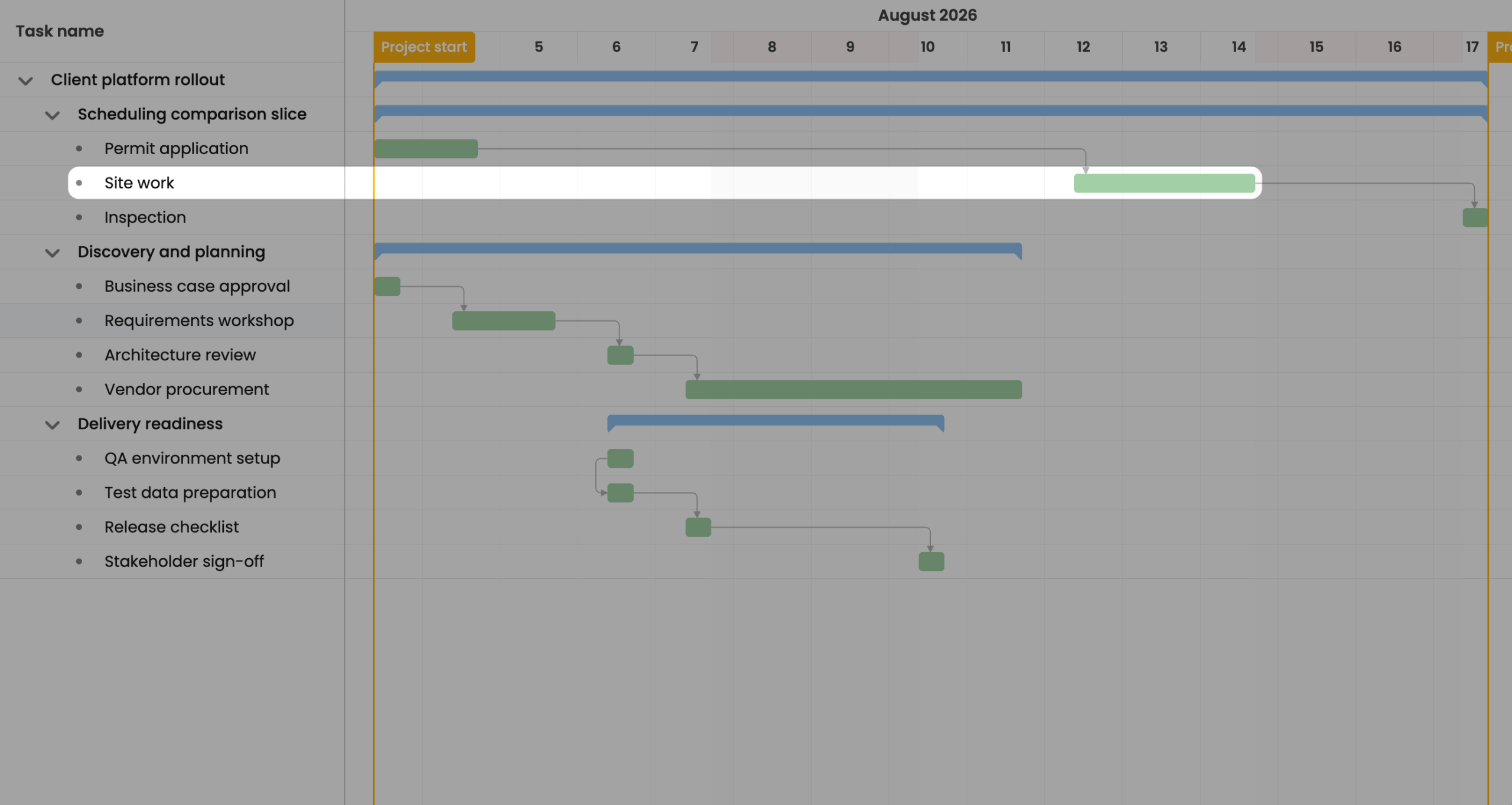
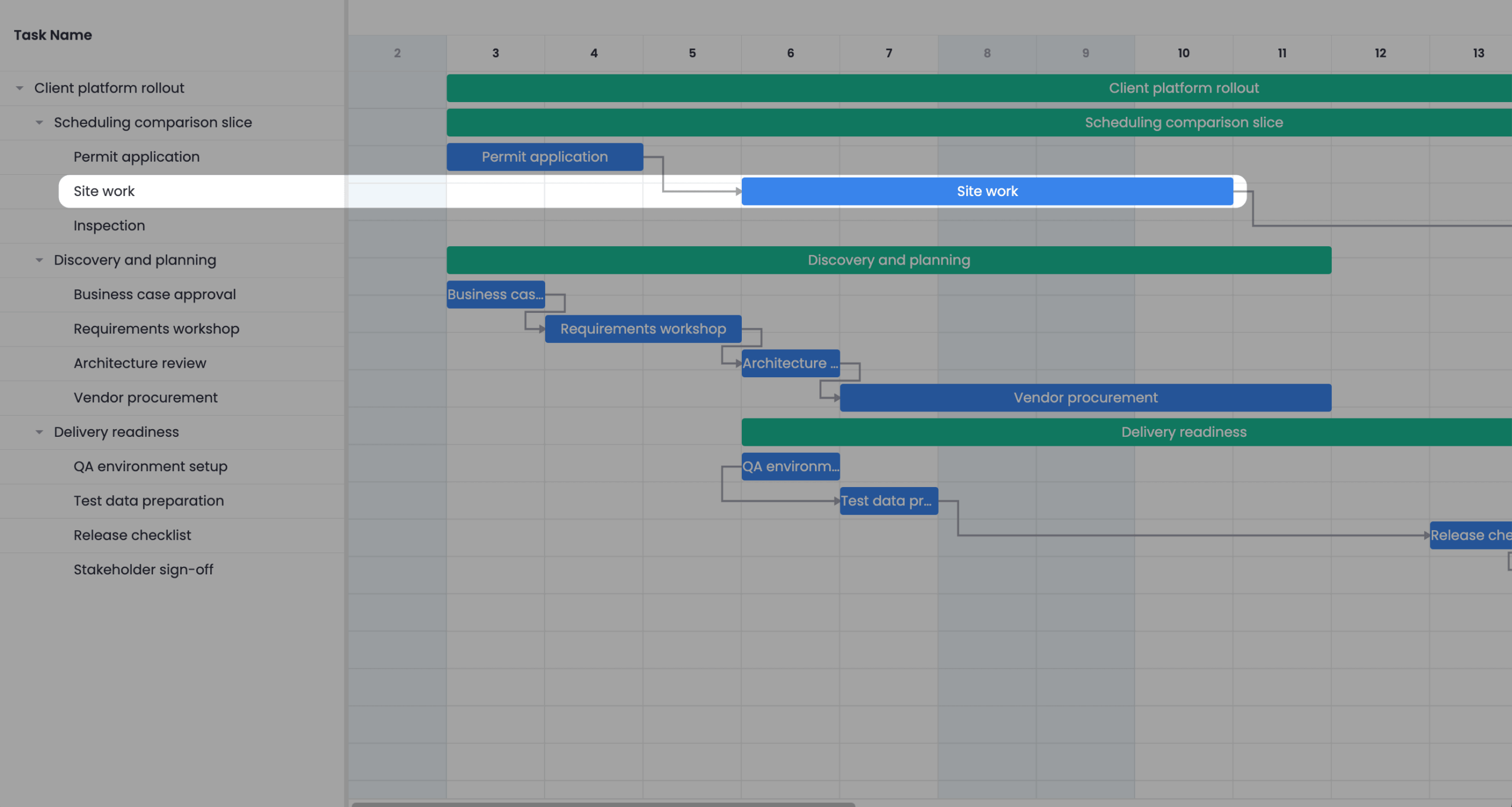
Bryntum’s engine holds the task at August 12. SVAR Pro does not have this constraint, so the task starts soon after the predecessor finishes.
This constraint can represent a venue that can’t be booked, a permit that can’t be issued, or a team that’s not free until a specific date. SVAR Pro can’t represent these situations.
Working-time calendar: skipping weekends
A project-level calendar tells the engine which intervals are productive time. We set up a Mon–Fri 09:00–17:00 calendar and gave a 2-working-day task a Friday 16:00 start:
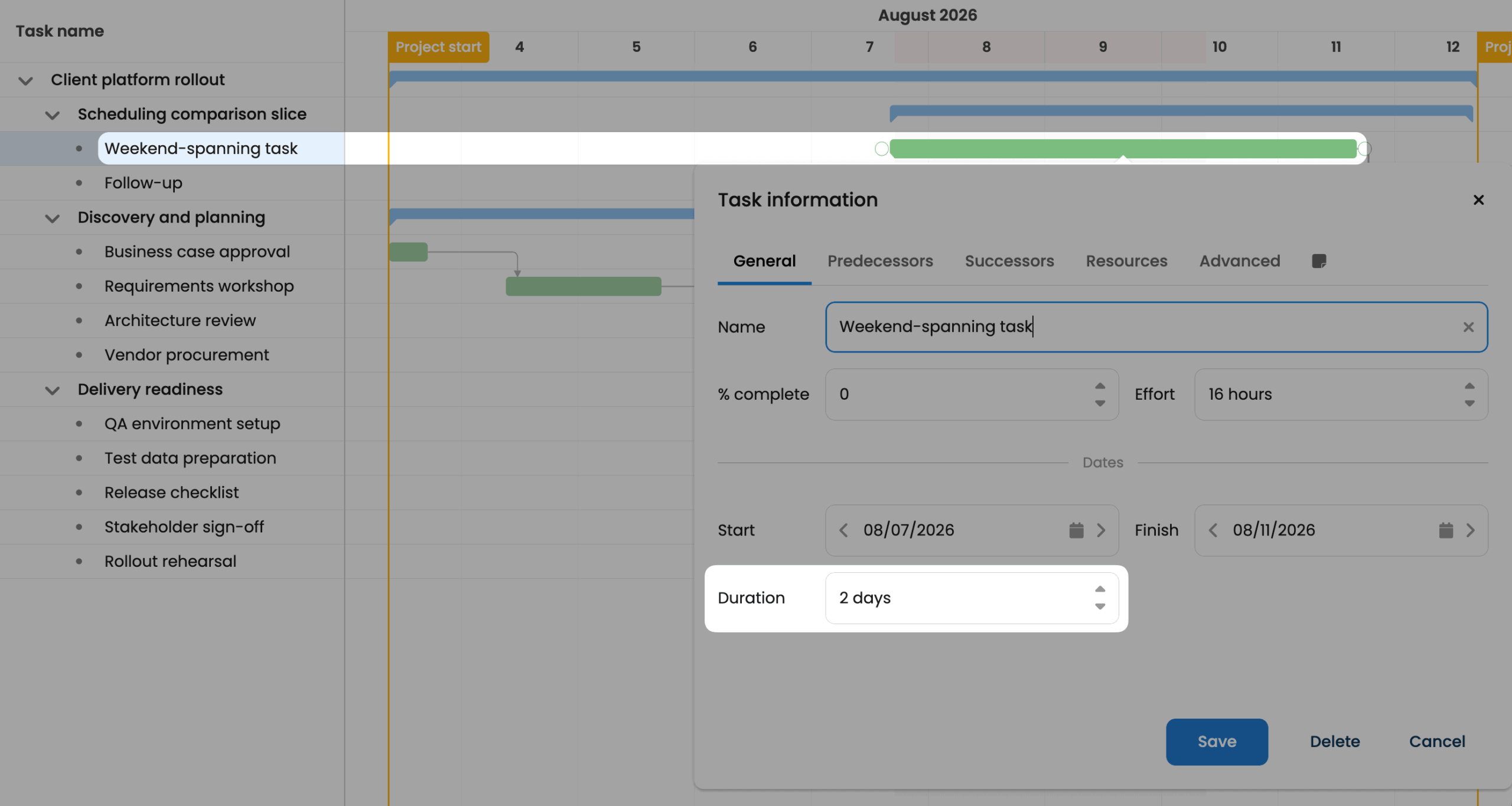
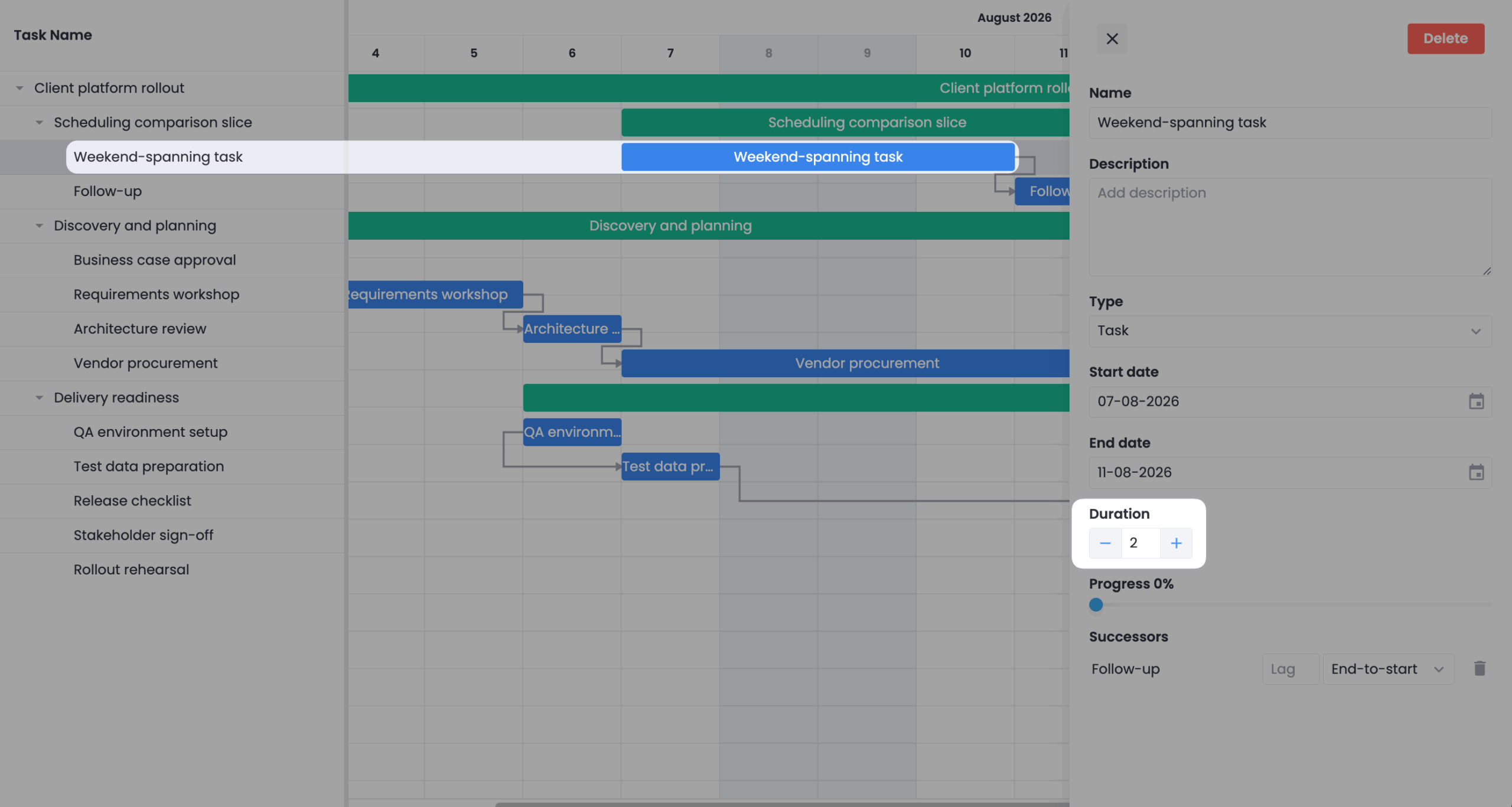
Both products skip the weekend and end on Tuesday. In the Bryntum Gantt, hoursPerDay: 8 means duration: 2 days is converted to 16 working hours, which are placed inside the calendar’s working intervals. The task uses 1 working hour on Friday, skips Saturday and Sunday, then continues on Monday and Tuesday. Bryntum can model exact intra-day intervals but SVAR Pro only has hours-per-day totals.
Resource calendar: skipping Wednesday
Resource calendars model the availability of individual people: holidays, partial allocations, shared-resource conflicts. We assigned a 3-day task to a single resource whose calendar has Wednesday off:
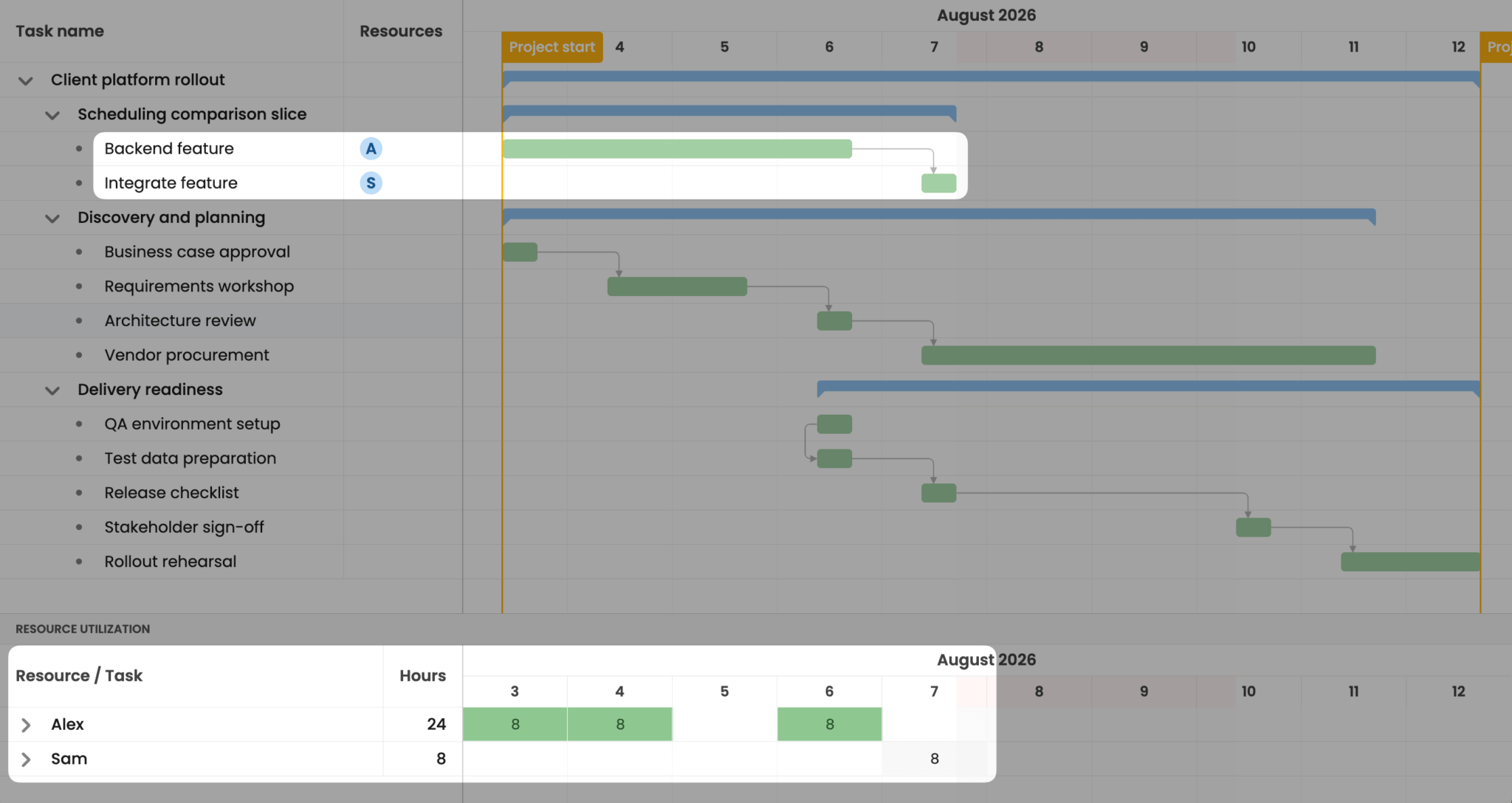
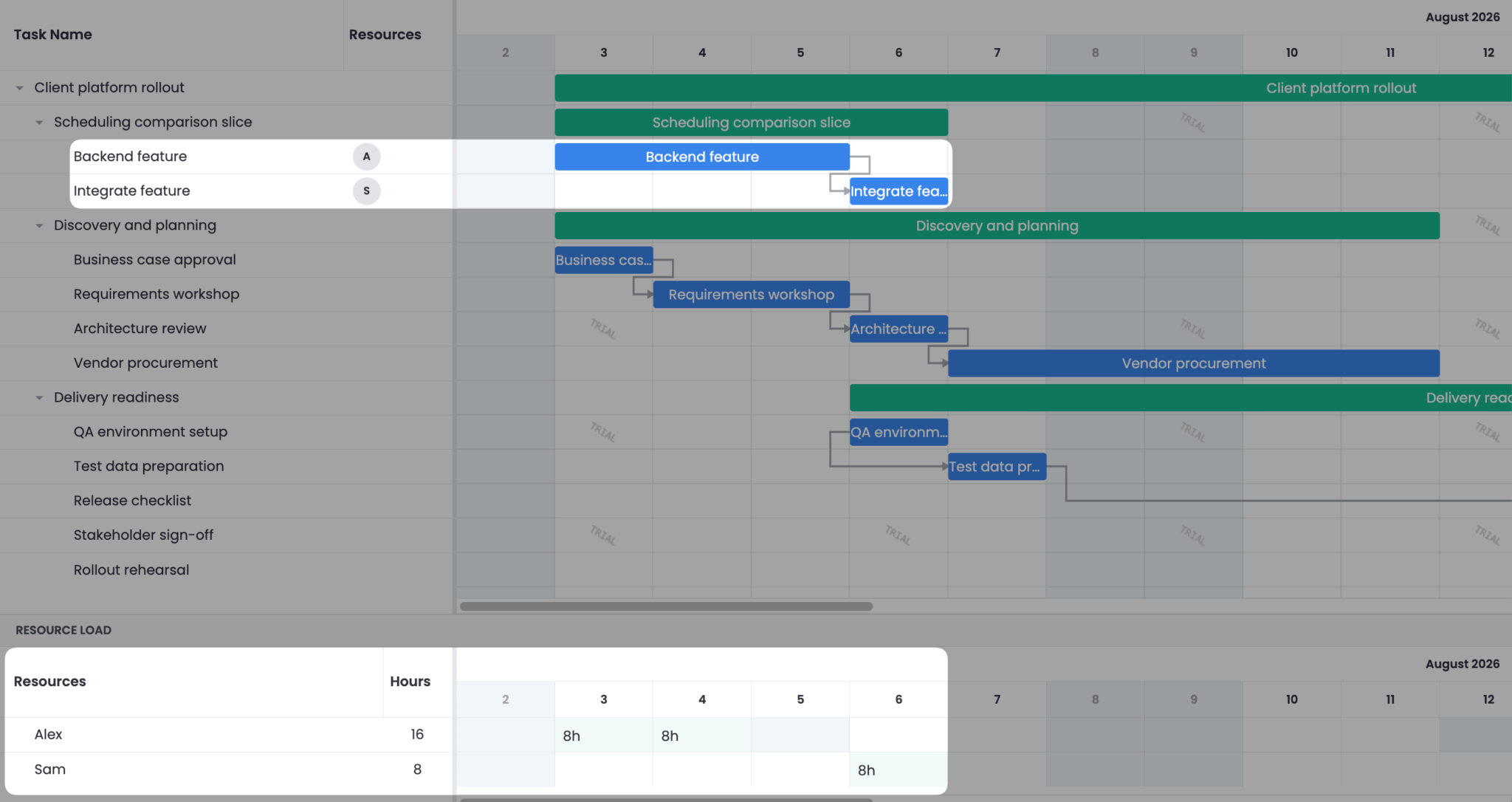
Bryntum’s engine schedules against the intersection of the task calendar and the resource calendar (Monday, Tuesday, Thursday, Friday, Monday) and extends the task an extra day, to the 6th, as it skips Wednesday. SVAR Pro has resource calendars, but they only show row shading in the resource-load grid and don’t affect task dates. The task ignores the resource’s Wednesday off and ends on the 5th.
Backward scheduling from a deadline
Backward scheduling places tasks as late as possible while still meeting a deadline. We configured a project that must finish by August 28 and set the Bryntum Gantt to schedule backward.
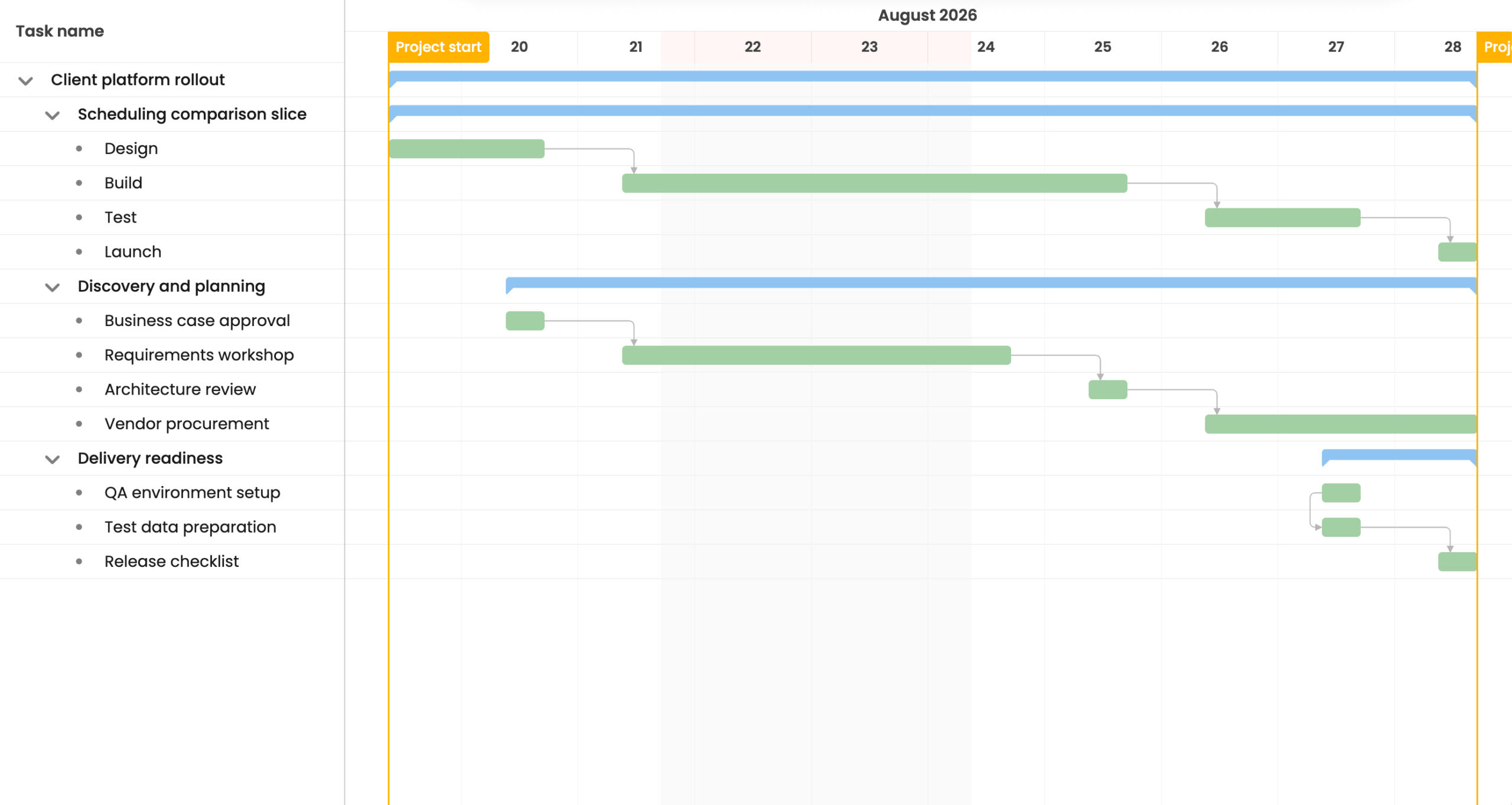
Bryntum supports this feature using the direction: 'Backward' field for projects: tasks are placed working backward from the deadline. SVAR Pro’s docs state explicitly that only forward propagation is supported, so backward scheduling can’t be represented.
For fixed-delivery projects such as launch dates, ship dates, and regulatory deadlines, backward scheduling is essential.
Critical-path
The Critical Path Method (CPM) computes the longest dependency chain through a project. Both Bryntum and SVAR Pro implement CPM. We enabled critical path visualization for both Gantts:
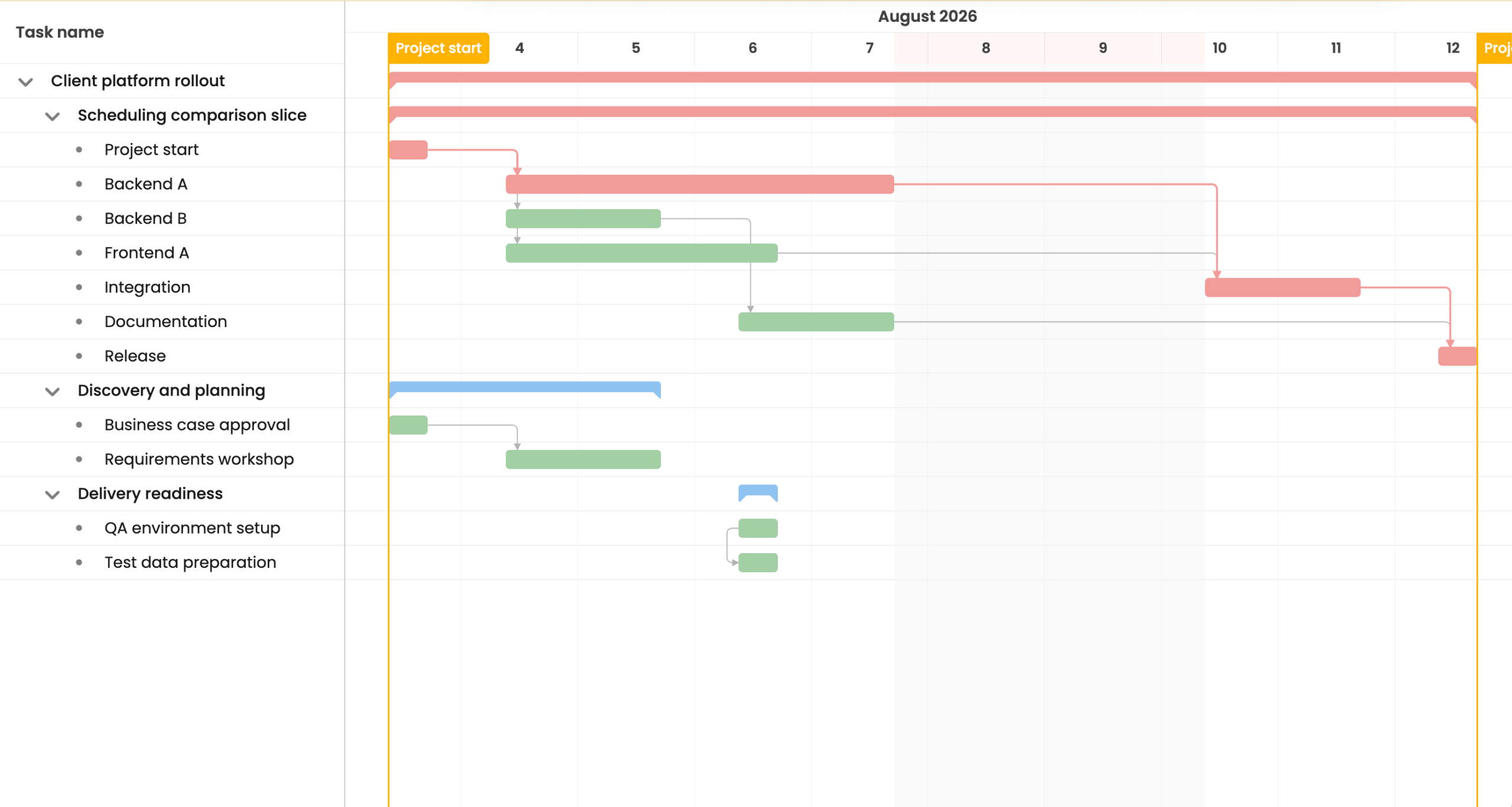
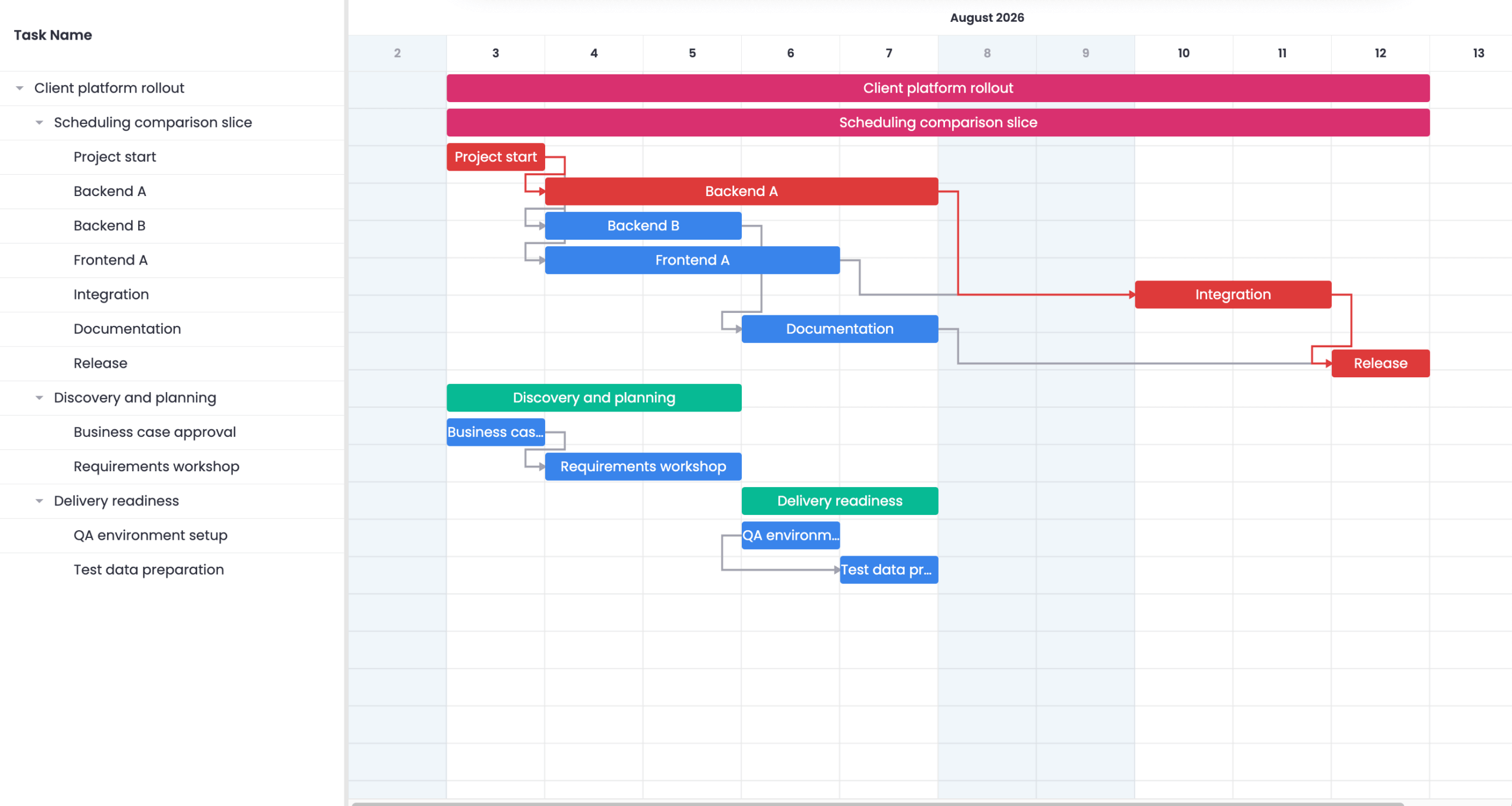
CPM is deterministic by design, and on this small graph both engines agree: they highlight the same critical path.
Scheduling-conflict handling
Scheduling engines also have to handle input they can’t satisfy. We tried to create a circular dependency (A → B, then B → A):
Bryntum prevents the dependency creation and displays a scheduling conflict popup that notifies the user that the dependency is invalid. SVAR also prevents the dependency creation but does not indicate to the user that the dependency is invalid.
Specific working-hour intervals (lunch break)
A working-time calendar can be more than day-off rules: it can specify exact intra-day intervals. We set up a project calendar with 09:00–13:00, 14:00–18:00 (a one-hour lunch break) and gave a 6-hour task a Monday 11:00 start:
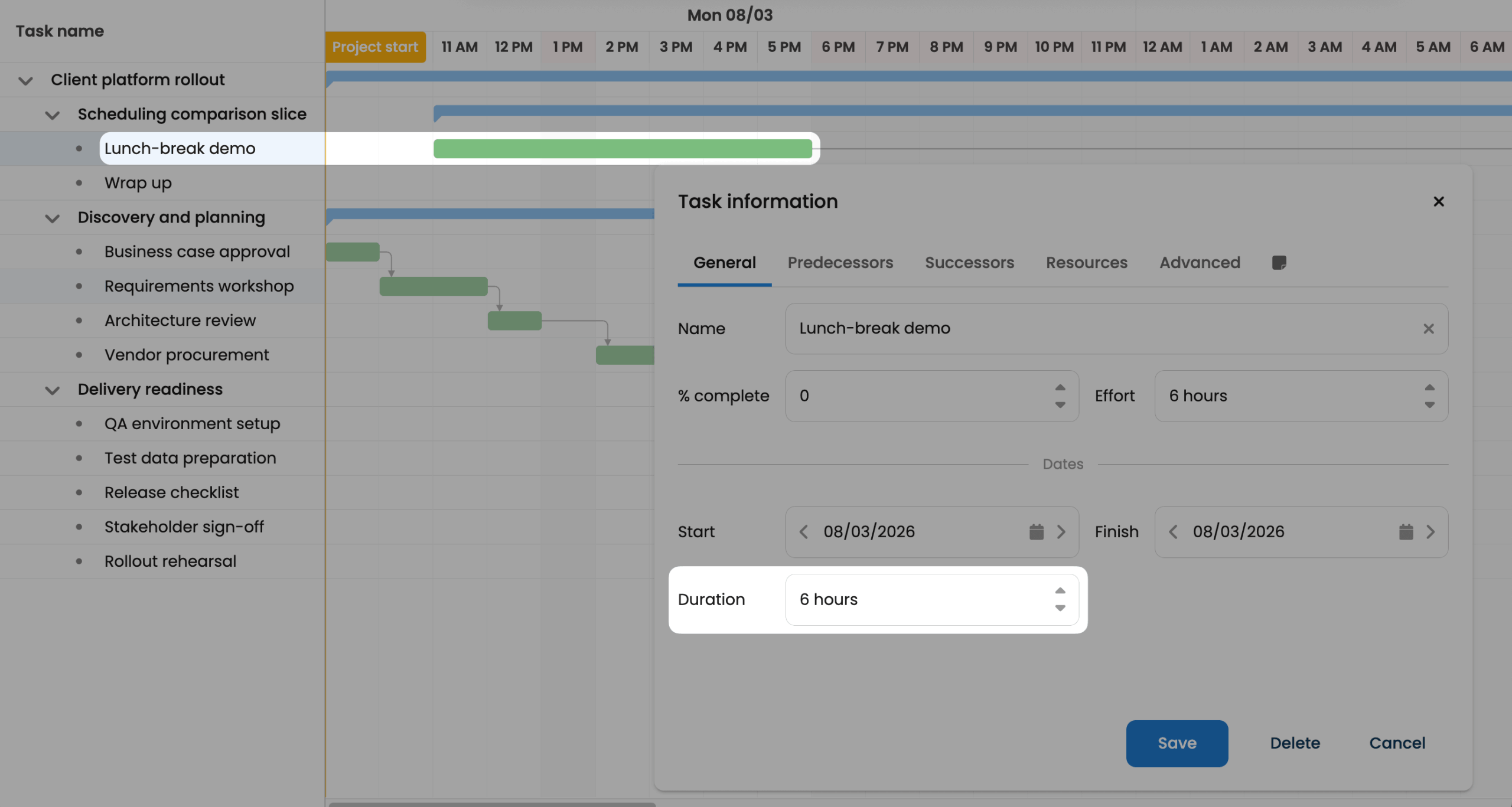
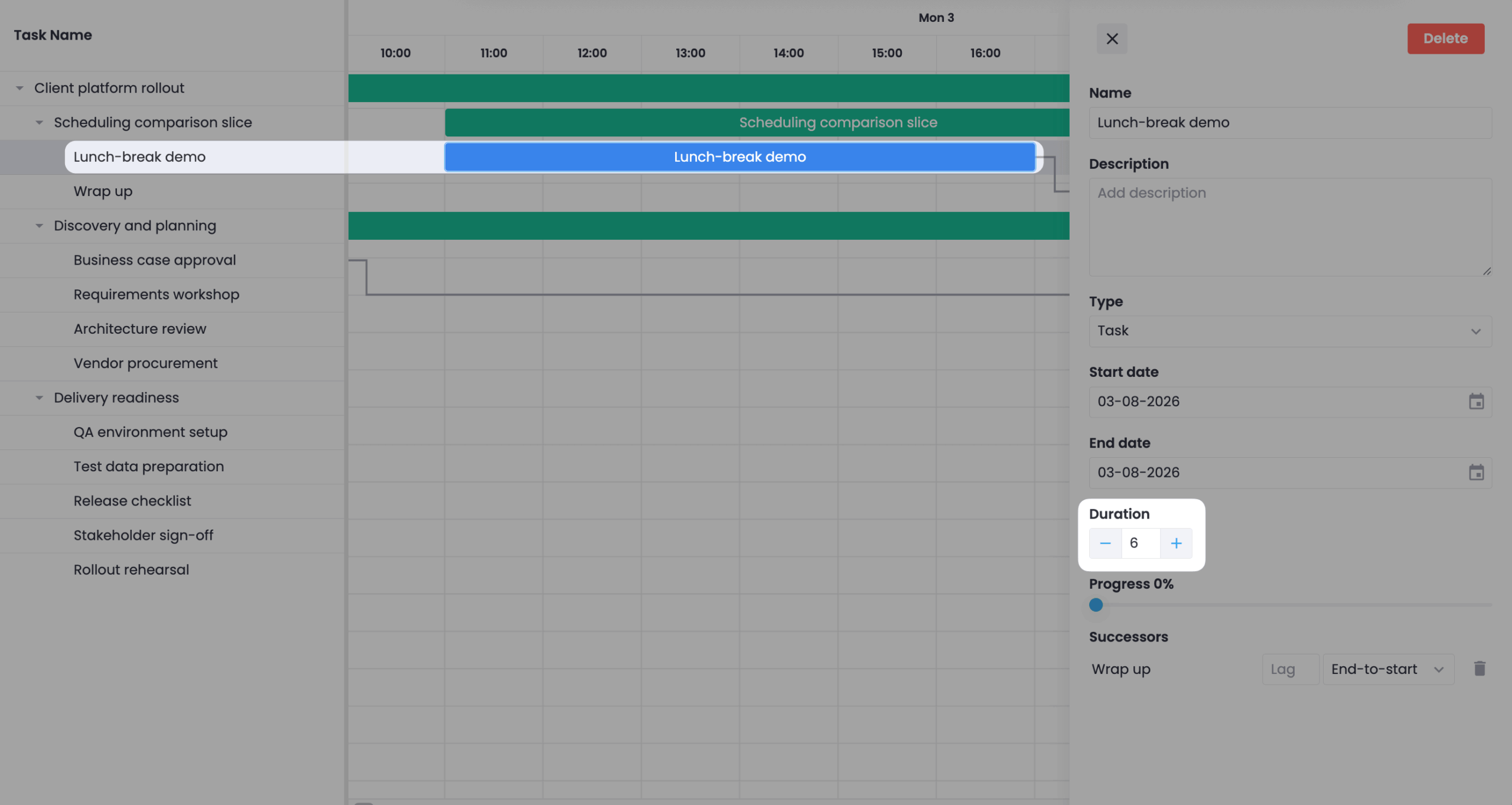
The Bryntum task correctly ends at 18:00; the SVAR task ends an hour earlier. SVAR Pro’s calendar takes total hours-per-day only, and its duration unit is limited to "day", so the lunch break can’t be expressed.
Effort-driven scheduling
Effort is the amount of work to be done; duration is how long it takes. With effort and resources, a scheduling engine should be able to compute duration: 16 hours of effort with one resource working 4 hours/day means a task takes 4 days to complete. With a second resource added and fixed-effort scheduling enabled, the task should only take 2 days to complete.
We set up a 16h effort task with one resource in both products, then added a second resource to it:
The Bryntum Gantt has Effort and Actual Effort fields on tasks, and a fixed-effort scheduling mode, so the task duration shrinks: with Sam added, the task only takes two days and the booked hours still total 16. SVAR Pro has no effort field and no fixed-effort scheduling mode. Assigning Sam through SVAR’s Resources tab leaves the task duration unchanged: the resource-load grid books both people 4 hours a day across the same four days, so the same task now consumes 32 booked hours instead of 16. Adjusting the resource units % changes the booked hours but does not change the task duration.
With this type of scheduling, you can answer the question: “if I add more people to this task, when does it finish?”.
Inactive tasks
A plan often contains work that is on hold or cancelled but shouldn’t be deleted. Making a task inactive excludes it from the scheduling process while keeping it in the plan. We set up a Spec → Build → Review chain, gave Review a Start No Earlier Than floor, and deactivated the Build task:
The Bryntum Gantt has an inactive task field, editable from a checkbox column or the task editor. Deactivating “Build” grays out its bar and keeps its dates. Inactive tasks are excluded from the scheduling process so they cannot affect regular active tasks: dragging the inactive “Build” no longer pushes “Review”, which falls back to its own constraint.
SVAR Pro has no inactive-task feature. The closest feature it offers is unscheduled tasks, which is what we show in this scenario: unscheduling “Build” strips its start and end dates, removes its bar from the chart, and its dependency lines vanish with it. The task name remains in the grid, but the plan information is gone.
Unscheduled tasks, a feature that Bryntum also has, are not a substitute for inactive tasks. An inactive task keeps its dates and its place in the plan; an unscheduled task is removed from the schedule.
Why most projects that need scheduling should choose Bryntum
Across the fourteen scenarios, Bryntum produced the correct schedule in all fourteen (14/14) and SVAR Pro in four (4/14). In three of SVAR Pro’s failures (SS, FF, SF) the link draws correctly, but its auto-scheduler never propagates it, so moving the predecessor leaves the successor where it was. Resource calendars fail the same way: SVAR Pro accepts a calendar on a resource, but it only shades the resource-load view; task bars never reschedule around it. The other six fail at the input stage, because the capability is missing outright: both constraint modes (Must Start On and Start No Earlier Than), backward scheduling, intra-day working-hour intervals, effort-driven scheduling, and inactive tasks.
If your Gantt only needs to visualize a plan, with task bars and dependency lines you arrange by hand, SVAR’s free React Gantt is a good option. SVAR Pro adds an auto-scheduler that propagates finish-to-start links and computes a critical path, but it stops there: it has none of the constraint modes, intra-day calendars, backward scheduling, effort-driven scheduling, or inactive tasks that real project planning needs, and its resource calendars never move a task. If you need these features, the React Bryntum Gantt is the best choice.
Build it with Bryntum Gantt
Start a free trial, explore live demos, or read the docs.