Scheduling complexity is conserved: what Bryntum’s mental model buys you
We strive to keep posts updated, but code samples may sometimes be outdated. Humans, see the Bryntum documentation; agents, https://mcp.bryntum.com for the latest info.
There’s a certain conclusion people often reach when they compare scheduler libraries: Bryntum is the most capable option, but the price to pay for its depth is complexity that demands a heavier mental model.
We agree with the result, but disagree with the framing.
There’s an observation about complexity in software that’s old enough to have a name; Tesler’s Law states that every system carries an inherent amount of complexity that cannot be reduced, only moved.
When working with a scheduler, you’ll find that complexity will exist either in the library or your application code; a lightweight scheduler is one whose hardest problems will become your backlog. Bryntum’s mental model includes a project with stores, a scheduling engine, transactional state tracking, and working-time calendars. Those concepts are the features that make the scheduler functional, not an additional feature adoption tax. After all, a model that carries complexity should also absorb it, and that’s something Bryntum gets right: the concepts are big, but the code that drives them is small. For instance, the transactional undo shown later in this post is a toolbar widget and one config flag, and the constraint that triggers a conflict popup is two fields on a task.
To see a practical example of what carrying the complexity buys (and what shedding it costs) we built the same small project plan in Bryntum Gantt and a lightweight Gantt implementation in identical vanilla JavaScript apps. We performed ordinary project-manager tasks with both: dragged tasks, edited dates, pinned a review meeting, and linked tasks into a loop.
Bryntum Gantt produced a correct schedule in every test. The lightweight implementation propagated dependencies correctly, then corrupted its schedule on a single undo, moved a user’s end-date edit two days past the date picked, and flagged a violated constraint without naming it or offering a fix.
This post walks through each of these scheduling scenarios.
One naming note before the results: Bryntum ships three timeline components: Bryntum Scheduler visualizes events on a timeline. Bryntum Scheduler Pro and Bryntum Gantt calculate schedules using the Bryntum ChronoGraph scheduling engine. This reactive state management system matches Microsoft Project logic and supports projects of any size.
The code for both apps can be found in our comparison GitHub repository.
“Hello world” is not the hard part
First, the learning curve needs scoping, because it’s not at the start. A working Bryntum Gantt needs this much JavaScript:
import { Gantt } from '@bryntum/gantt';

const gantt = new Gantt({
    appendTo : 'app',
    project  : {
        tasks : [
            { id : 1, name : 'Design the landing page', startDate : '2026-07-06', duration : 8 },
            { id : 2, name : 'Build the landing page', duration : 8 },
            { id : 3, name : 'Launch', duration : 0 }
        ],
        dependencies : [
            { id : 1, fromTask : 1, toTask : 2 },
            { id : 2, fromTask : 2, toTask : 3 }
        ]
    }
});
This does not include start dates for the second and third tasks. The project’s scheduling engine computes them from the dependencies the moment the chart renders.
Undo has to account for the whole schedule
Here’s a common sequence of events during project planning: drag a task, look at the result, change your mind, click undo. We did the following to test it:
- Set up three 3-day tasks for an example construction project linked finish-to-start: Foundation into Framing into Roofing.
- Dragging Foundation five working days to the right worked in both engines: each one skipped the weekends and kept every duration intact.
- Clicked undo once for each Gantt.
Bryntum Gantt put all three tasks back exactly where they started:
The Bryntum Gantt’s project State Tracking Manager records the drag and the two recalculated successors as one transaction, so one undo restores the whole cascade. In our test app, the wiring for that is shorter than this sentence:
new Gantt({
    tbar    : [{ type : 'undoredo' }],
    project : {
        stm : { autoRecord : true }
    }
});
This adds Bryntum’s own undo and redo buttons to the toolbar and records every change as a transaction. This is the only part of undo that a developer has to touch; the machinery it switches on (transactions recorded across every store in the project) is the part of the mental model you don’t have to write.
The lightweight Gantt, however, did not restore the tasks correctly:
The 9-working-day task silently became a 16-working-day task. It showed an issue with the Foundation task that you can see by clicking the orange dot on the highlighted task bar:
Task "t1" has an invalid date range.Reverting one field is not enough; undo must capture and restore all changes as a unit, which is why Bryntum’s scheduling engine has a state-tracking manager.
One schedule needs one definition of duration
The next ordinary action we performed was to edit a task’s end date.
We linked the task Write chapters to Review chapter, finish-to-finish, and both engines correctly aligned the two finishes on load. Then we set the predecessor’s end date to Tuesday, July 14, two working days later using the task editors:
In Bryntum Gantt, the task ends July 14. The duration recalculates from 5 working days to 6, and the review task’s finish follows to the same date, its own duration untouched: the date you pick is the date you get.
In the lightweight Gantt, picking July 14 in its own date picker produced July 16, on both tasks.
The lightweight library’s TypeScript declarations point to the cause. The task model documents durationDays as calendar days between start and end, while the scheduling option that makes durations respect holidays counts working days. An end-date edit that spans a weekend is measured by one ruler and replaced by the other, while the task grows by the weekend inside it.
This is the kind of bug the “heavier” model prevents. In Bryntum’s engine, duration is one concept with one definition, working with time as granted by the calendar, and with every consumer of it (the editor, the drag handler, the dependency solver) agreeing. That coherence is invisible right up until the day it is the only thing standing between your user’s edit and a schedule that contradicts itself.
A good scheduling engine argues back
Real plans contain contradictions. A review meeting is pinned to the 13th, and the preparation work now runs past it. Two tasks end up interdependent. Either product will let you create the contradiction; the interesting question is what it says when you do.
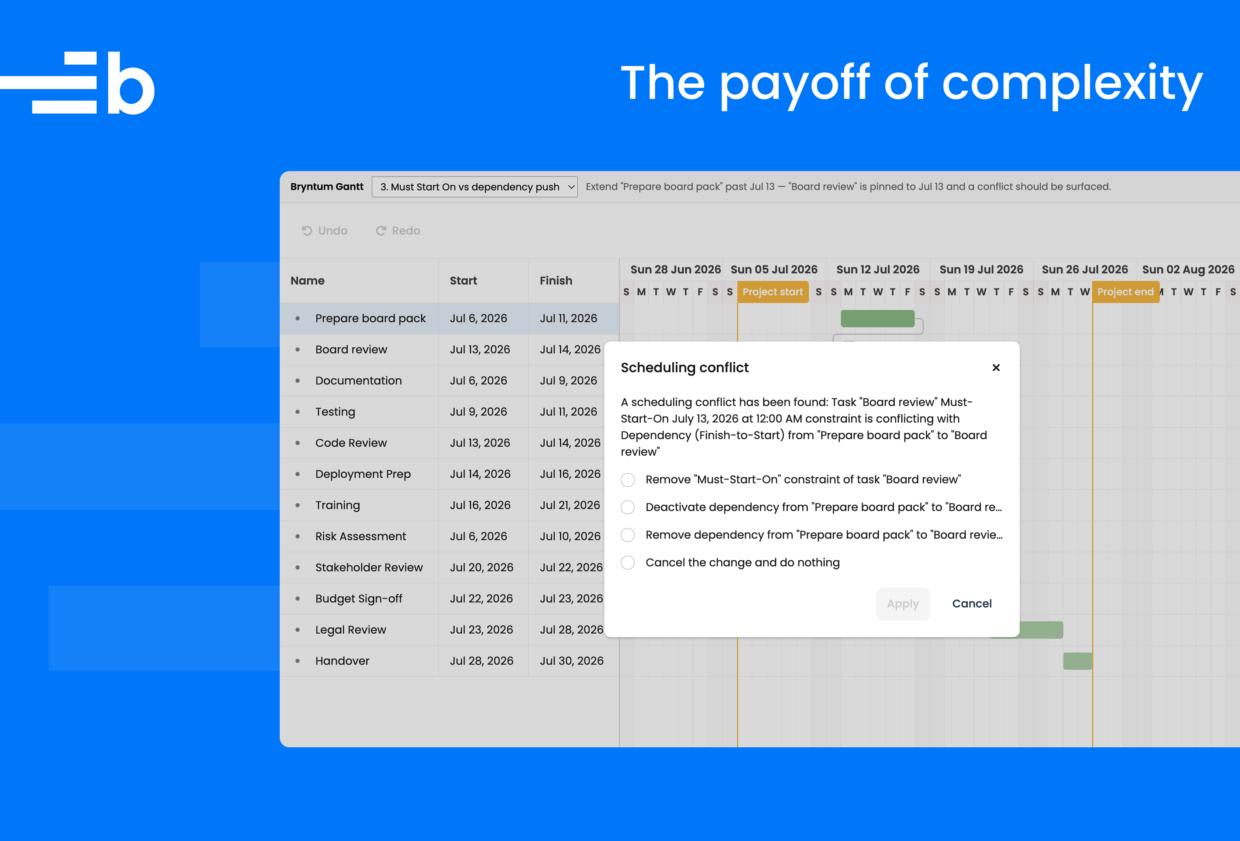
We pinned a one-day Board review task to July 13 with a Must Start On constraint, fed by a finish-to-start link from a Prepare board pack task, then extended the preparation task past the pinned date.
With Bryntum, the pin costs two fields on the task:
{
    id             : 2,
    name           : 'Board review',
    startDate      : '2026-07-13',
    duration       : 1,
    constraintType : 'muststarton',
    constraintDate : '2026-07-13'
}
This is the entire price of the concept. What it buys is everything that happens next, because the plan now contradicts itself: the dependency wants the review later, while the constraint forbids it.
Bryntum Gantt raised a scheduling conflict popup naming both sides of the contradiction and offering to drop either side, deactivate the dependency instead of deleting it, or cancel the change that caused the clash:
The lightweight Gantt kept the review pinned to July 13 and marked the bars with an orange outline.
Clicking the small dot on the marked bar produces the whole explanation on offer: Task “t1” has an invalid date range. Which dependency, which constraint, and what to do about it go unmentioned, and “t1” is the task’s internal id, not the name the user gave it. The violated dependency stayed in the data, and a user can carry on editing a plan that can no longer happen.
Conflict handling is a feature you cannot see on a landing page because it only exists at the moments your data stops making sense. And those are precisely the moments a planning tool earns its keep.
Good MCP server coverage matters
An MCP server is only as useful as the documentation and examples it can retrieve: task models, dependency models, scheduling behavior, undo transactions, framework setup, CSS imports, and version-specific APIs.
This mattered while building these demos. We asked both MCP servers the same implementation questions:
- For “create a dependency between two tasks, finish to start”, the Bryntum MCP server returned the DependencyModel API documentation and complete project examples with dependency arrays. The lightweight library’s MCP server returned three getting-started pages for the data grid, and nothing about dependencies.
- For “undo redo history scheduler gantt”, Bryntum’s server returned the State Tracking Manager documentation, the exact API our test app went on to use. The lightweight library’s server returned a dropdown component readme and a column-ordering guide.
The difference changed the workflow. The Bryntum MCP server answered questions with API-level documentation and complete examples, so the AI assistant could quickly move from a scheduling question to working code. We had to assemble the lightweight Gantt app from a React example and the package’s TypeScript declarations instead.
The cause appears structural: the lightweight library’s MCP server indexes the open-source grid documentation, and the open-source grid contains no scheduler; the Gantt and Scheduler layers are commercial products documented on a separate Pro site the server does not cover. Asked to resolve “scheduler” as a feature, its own server reports that no such feature exists in its catalog. This might be because the Gantt is a new product.
The Bryntum MCP helps developers get started with Bryntum, configure Bryntum components, add features, integrate with other products, and handle version updates. It also has guideline resources, which are a curated set of rules to follow before it generates setup code, CSS imports, or framework examples. AI coding assistants can load these rules into context.
Scheduling complexity is conserved
The concepts in the heavier mental model are the ones this basic test kept finding essential:
- Transactions: Undo in the lightweight implementation corrupted the plan it was meant to restore.
- A single definition of duration: A date edit returned a different date than the user picked.
- Conflict resolution: Contradictions got flagged, but did not give options to resolve.
The lightweight Gantt draws schedules correctly and propagates dependencies, but everything separating that from managing a schedule went missing under ordinary use. Each concept showed up as the difference between a right schedule and a wrong one.
Adopting Bryntum does feel like adopting a scheduling platform, and that is the point. If your product only ever needs colored bars on a timeline, a lightweight Gantt is okay. But the moment it needs dependencies your users trust, dates that stay where they are put, and an undo button that can accommodate your full schedule, the full platform is what you want; the alternative is building one.
Next steps
The scenarios above isolate a few scheduling decisions that matter in real applications. To see more of these scheduling capabilities, take a look at the Bryntum Gantt and Bryntum Scheduler Pro demos below.
Bryntum Gantt demos:
- Postponed conflicts and custom constraints
- Storing and restoring state
- Scheduling conflict resolution popup
Bryntum Scheduler Pro demos:
Try Bryntum components
Fast, framework-agnostic UI components for scheduling and project management.
Related posts