RevoGrid vs Bryntum: JavaScript Scheduler comparison 2026
We strive to keep posts updated, but code samples may sometimes be outdated. Humans, see the Bryntum documentation; agents, https://mcp.bryntum.com for the latest info.
If you’re evaluating a scheduler to plan real resource use such as shifts, equipment, or rooms, it has to do more than draw a timeline. When you move an event, dependent events have to move with it in both directions, respecting each resource’s constraints or working hours. When you overbook an engineer, the scheduler should show that. And when there are conflicts, it has to tell you what conflicts with what. Working-time calendars and dependencies are the two jobs a scheduling engine exists to do.
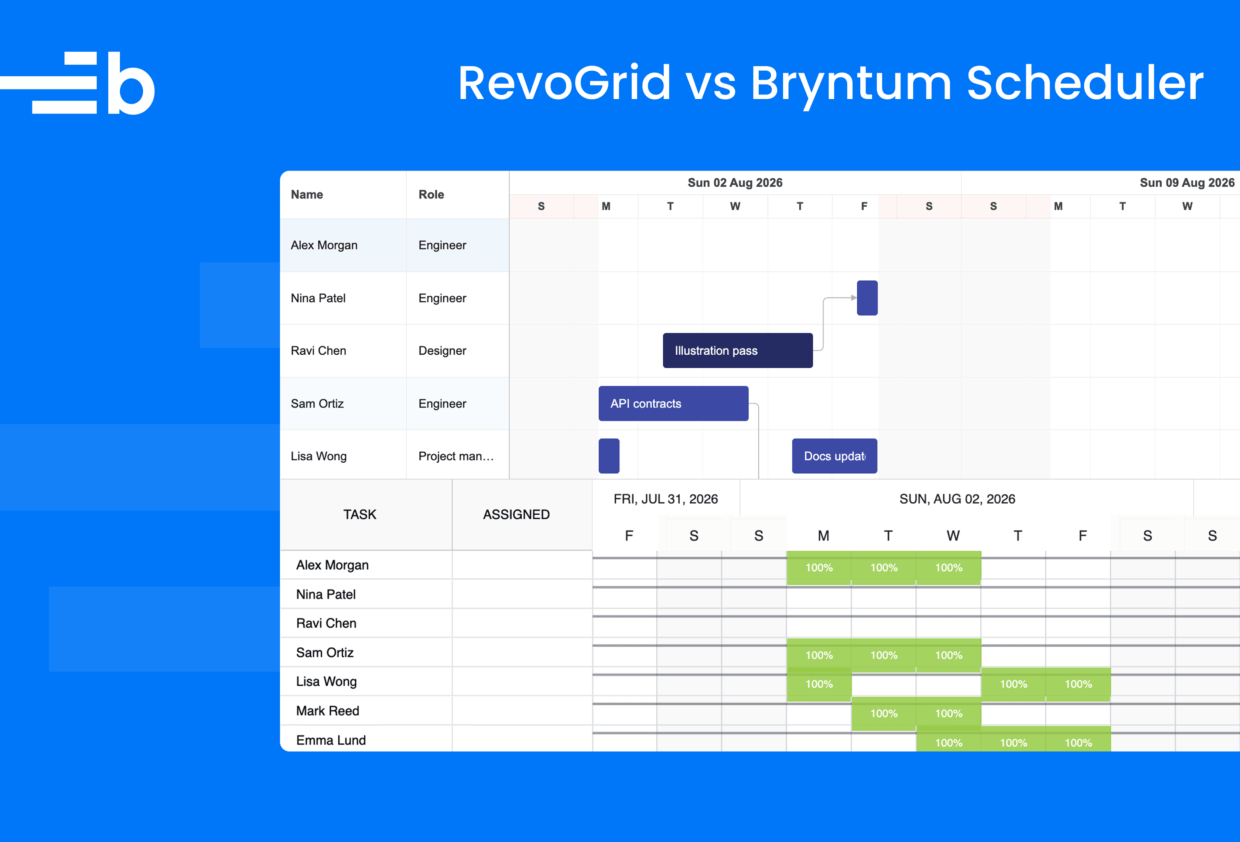
We compared Bryntum Scheduler Pro with RevoGrid’s Gantt and its resource planning view, which RevoGrid markets as the RevoGrid Scheduler. For each, we built an app with thirteen scheduling scenarios and identical input data. Each scenario is a task a scheduler is expected to handle: honoring a resource’s working days, cascading a dependency in both directions, flagging an overbooked resource, and surfacing a scheduling conflict, among others.
Bryntum Scheduler Pro scored 13/13 and RevoGrid scored 8/13. RevoGrid’s Gantt renders bars, cascades drags, snaps to the working week, flags over-allocation, and supports undo. But it does not honor per-resource working-time calendars, does not pull a successor earlier when its predecessor moves earlier, does not clearly name or help resolve scheduling conflicts, gives you no resource row to drag work onto another resource, and lets a manually pinned event drift when a dependency chain collides with it. Bryntum handled all thirteen scenarios and surfaced conflicts as named, resolvable problems.
What the RevoGrid Scheduler is
RevoGrid has a Scheduler page but it isn’t a standalone scheduler component. The link labeled Scheduler opens a RevoGrid Gantt demo, the docs button opens the Gantt guides, and their documentation defines a Scheduler as a “Gantt + resource management + auto-calculation”. In practice, then, the Scheduler is the Gantt plus its resource planning view, which lets you visualize daily or weekly load, capacity thresholds, and over-allocation hotspots. That framing matters for the comparison, because it means the scheduling behavior lives in the Gantt, which is where we tested it.
Bryntum Scheduler vs Scheduler Pro vs Gantt
Bryntum has three timeline components: Bryntum Scheduler visualizes events on a timeline. Bryntum Scheduler Pro and Bryntum Gantt calculate schedules using the Bryntum ChronoGraph scheduling engine. This reactive state management system matches Microsoft Project logic and supports projects of any size.
Take a look at our Gantt vs Scheduler vs Timeline guide that explains which Bryntum component fits which planning problem.
Bryntum Scheduler Pro vs RevoGrid Gantt (“Scheduler”)
Every scenario below is a test we did by hand in both apps, with identical input data. We used Bryntum Scheduler Pro version 7.3.3 and RevoGrid version 4.23.21
| # | Scenario | Bryntum Scheduler Pro | RevoGrid Gantt (“Scheduler”) |
|---|---|---|---|
| 1 | Give a resource a Tuesday to Thursday working week, then assign them a task starting Monday | ✓ The task moves to Tuesday and runs Tuesday to Thursday | ✗ The task stays on Monday |
| 2 | Move a predecessor task earlier | ✓ The successor task follows | ✗ The successor never moves earlier than its stored date |
| 3 | Overbook a resource | ✓ Synced histogram shows booked hours against each calendar’s capacity line; over-allocated days turn red | ✓ Flags the right bars with an orange outline |
| 4 | Check the resource utilization view | ✓ A resource histogram synced to the timeline shows per-day hours against a calendar-aware capacity line | ✓ A per-resource load view shows per-day utilization and highlights over-allocation |
| 5 | Violate a pinned date constraint | ✓ “Scheduling conflict” dialog names the constraint and the dependency, offers four resolutions | ✗ The pinned date holds, but the only signal is a small dot on the event; no message, no offered fix |
| 6 | Create a circular dependency | ✓ Refused, with the loop spelled out and fixes offered | ✓ Dragging the arrow silently refuses to connect |
| 7 | Drag an event to reschedule it | ✓ Drag a bar on its resource row; it moves and dependencies cascade with working time respected | ✓ Dragging the event in the Gantt view moves it and cascades to dependents |
| 8 | Drag an event toward the weekend | ✓ It snaps to the next working days; weekends are shaded non-working time | ✓ Weekends are shaded non-working |
| 9 | Reassign by dragging to another resource’s row | ✓ Drag the bar to another row; the assignment updates | ✗ No resource rows to drag on; reassignment means opening the editor and toggling checkboxes |
| 10 | Add a second resource to a 32-hour fixed-work task | ✓ Effort stays 32h, the span holds, both assignments rebalance to 50% | ✓ Under its fixed-work model the task shortens to 2 days, consistently across the bar, the columns, and the editor |
| 11 | Assign one event to two resources at once | ✓ The event appears as a bar on both resource rows; assignments are editable with units | ✓ Both resources can be assigned and edited and the assignees update live |
| 12 | Undo after a cascaded change | ✓ One undo restores the chain | ✓ One undo restores the chain |
| 13 | Manually schedule an event, then collide a dependency chain with it | ✓ The pinned event stays on its date; the cascade doesn’t move it | ✗ The colliding cascade pushes the pinned event off its date |
Bryntum Scheduler Pro scored 13/13, and RevoGrid scored 8/13. Scenarios 1, 2, 5, 9, and 13 deserve a closer look because they’re the ones where the products diverge on things every scheduler should do.
You can see the Bryntum and RevoGrid apps in our GitHub repo.
Working-time calendars must actually schedule
Ravi works Tuesday to Thursday. We attached that calendar to his resource and gave him a three-working-day task starting Monday. There is only one correct answer: the task moves to Tuesday and runs Tuesday through Thursday.
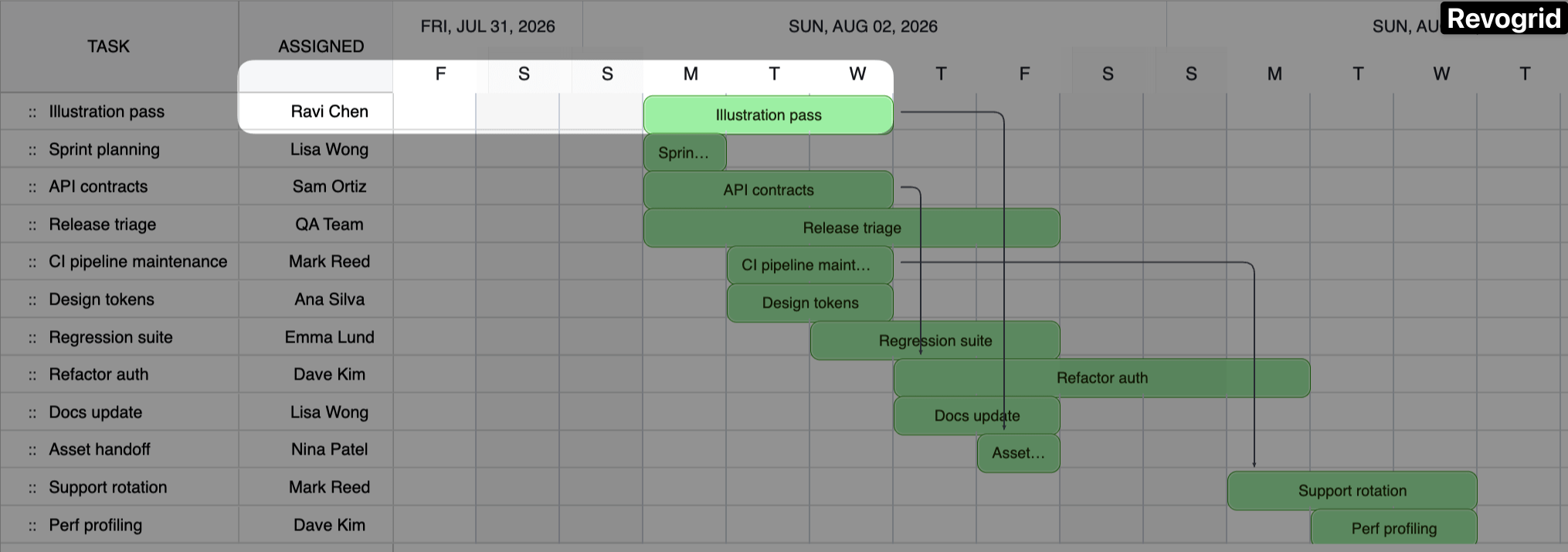
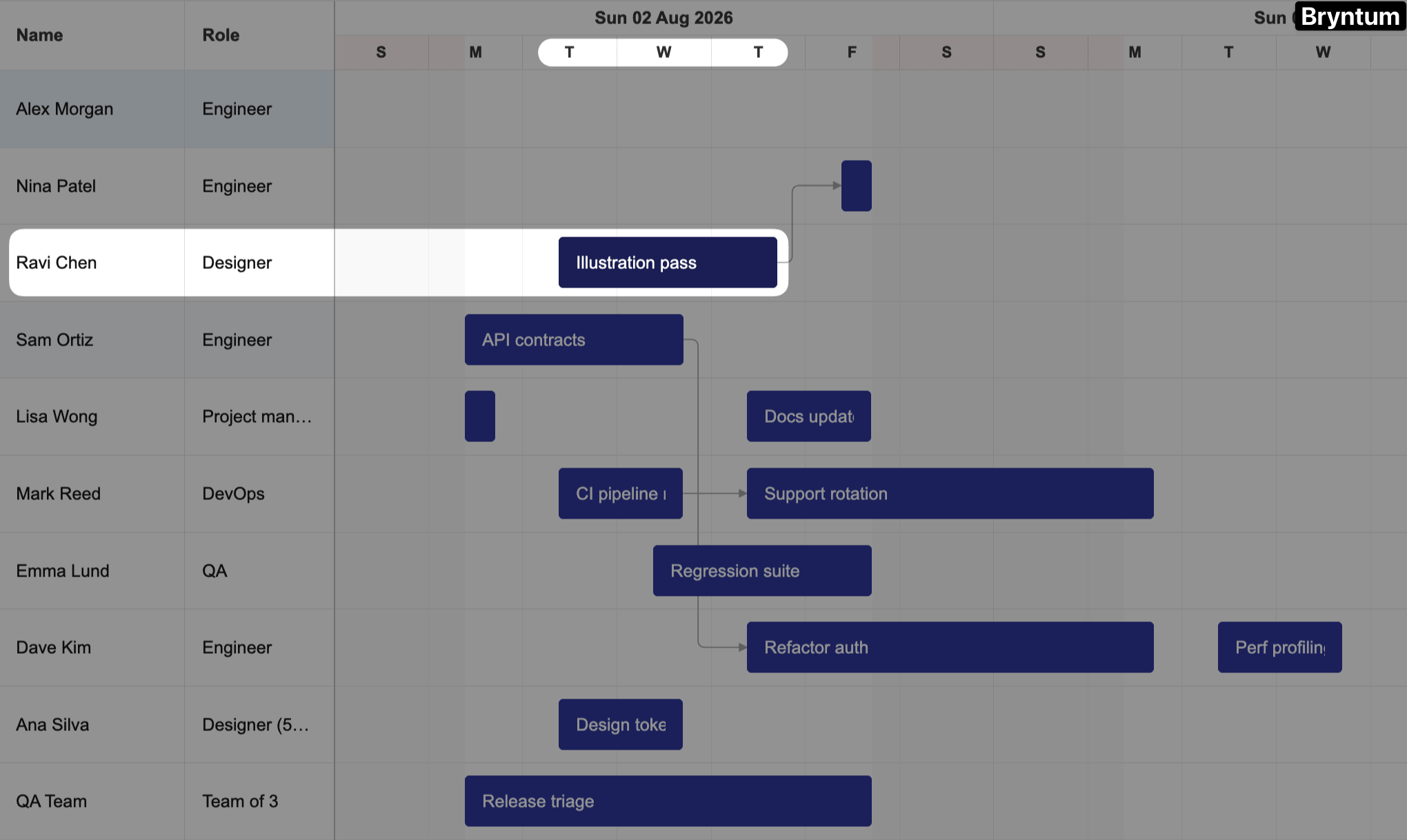
In Bryntum Scheduler Pro, the task starts Tuesday at 09:00 and finishes Thursday at 17:00. The resource calendar is a scheduling constraint. RevoGrid left the task on Monday, a day Ravi doesn’t work.
The distinction is specific. RevoGrid does honor the project-level working week: weekends are shaded non-working time, and a dragged event snaps to the next working day. What it doesn’t do is treat a per-resource calendar as a scheduling constraint. Ravi’s Tuesday-to-Thursday week is ignored, so his task stays on Monday even though the engine knows he doesn’t work then.
Dependencies must work in both directions
We created a “Contract draft” task that ends on a Friday. Its Finish-to-Start successor has one working day of lag, so it starts on Tuesday because the lag skips the weekend. Both products get that baseline right, and both cascade correctly when you drag the predecessor later. The difference appears when a plan improves and you drag the predecessor earlier.
In Bryntum, the successor follows the predecessor in both directions. Finish earlier and the whole chain tightens, which is the point of as-soon-as-possible scheduling. In RevoGrid, the successor never moves earlier than its stored date: finish the predecessor three days early and the successor sits where it was, with dead slack in between. If your team beats a deadline, RevoGrid’s schedule doesn’t notice; a scheduler that only ever pushes work later can only deliver bad news.
A conflict you can’t see is a conflict you’ll ship
We created a “Board review” task that’s pinned, with a Must-Start-On constraint, to August 12. We then stretched its predecessor task past that date:
Bryntum opened a “Scheduling conflict” dialog with the message “Task ‘Board review’ Must-Start-On August 12, 2026 constraint is conflicting with Dependency (Finish-to-Start) from ‘Prepare board pack’ to ‘Board review'” and four options: remove the constraint, deactivate the dependency, remove the dependency, or cancel the change. RevoGrid held the pinned date, which is correct, but its only signal was a small marker on the event. No dialog, no message, no fix.
Reassigning work needs a resource row you can drag on
A resource scheduler’s core surface puts events on resource rows and lets you work there: drag along a row to reschedule, drag between rows to reassign. RevoGrid gets you halfway. In its Gantt view you can drag an event to reschedule it and the change cascades to dependents. But that view is task-centric — there are no resource rows on it. Its one resource-centric surface, the resource planning view, renders load percentages and is read-only:
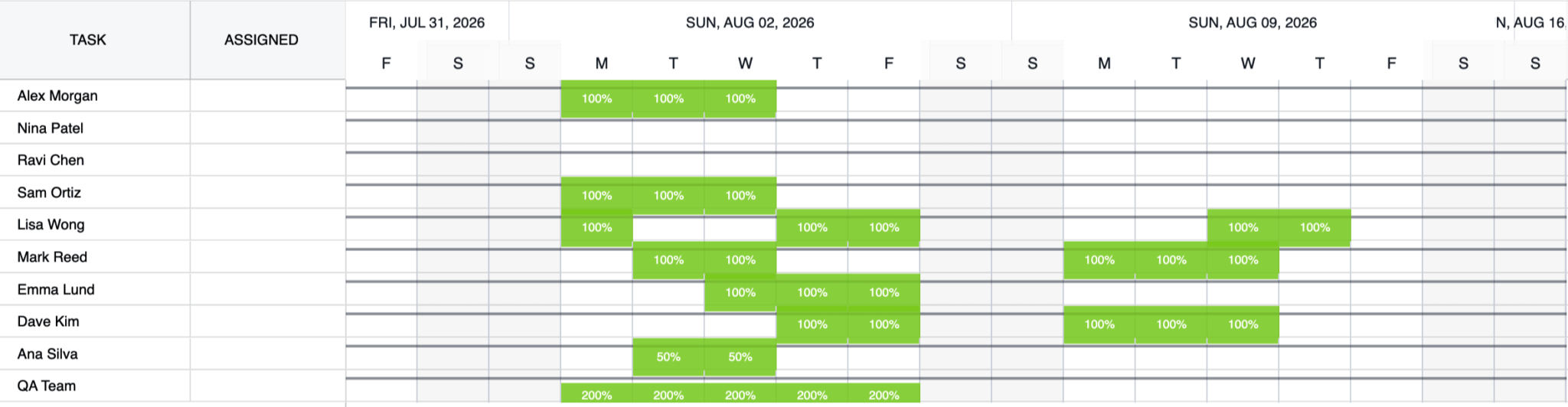
So there is no view anywhere in the RevoGrid Scheduler where an event sits on a resource row and can be dragged from one resource to another. Reassigning “Hotfix deploy” from Alex to Nina means opening the editor and toggling checkboxes, not dragging the bar onto Nina’s row. What Bryntum treats as the scheduler’s core surface, a resource timeline you can both reschedule and reassign on, RevoGrid offers only as a chart to look at. This is why we ran the interactive comparisons in the Gantt task view.
A pinned event has to stay pinned
Manual scheduling exists so that some events don’t move. We manually scheduled a “Maintenance window” for August 12, then dragged an upstream “Build pipeline” task later so its dependency chain would push into that date. The point of a manually scheduled event is that the engine leaves it alone.
Bryntum held the “Maintenance window” on August 12 and let the cascade stop at it. RevoGrid pushed it off August 12 along with the chain — the pin didn’t hold. An event you’ve explicitly fixed to a date is one the schedule shouldn’t be free to move, and here it moved.
Feature comparison
The behavior above has a structural cause: Bryntum Scheduler Pro is built around a scheduling engine; RevoGrid’s Gantt is a grid with scheduling features added on. The gap shows across the feature list:
| Feature | Bryntum Scheduler Pro | RevoGrid Gantt + resource view |
|---|---|---|
| Interactive resource timeline | ✓ Native view: events are draggable bars on resource rows | ✗ Resource view is a read-only load heatmap; all interaction happens in the task-centric Gantt view |
| Nested events | ✓ Parent/child events with dependencies between them | ✗ |
| Travel time | ✓ Buffers before/after events for field and callout work | ✗ |
| Utilization views | ✓ Resource histogram and resource utilization partner views, synced to the timeline, with capacity lines | ~ Per-resource load view with over-allocation highlighting, as in-grid percentage cells; no separate synced histogram widget |
| Recurring events | ✓ RFC-5545 recurrence rules with exception dates and an occurrence-editing popup | ✗ No recurrence in the Gantt docs, despite “shifts” being the marketed use case |
| Split events | ✓ Right-click to split; drag segments individually | ✗ Split ranges exist in the data model; no interactive splitting documented |
| Calendar editor UI | ✓ End users edit working time in a dialog | ✗ |
| Natural language scheduling input using AI | ✓ Match tasks to team members by skills and availability demo with an AI chat panel | ✗ |
That last row points to where scheduling may be heading. Bryntum Scheduler Pro’s AI chat panel lets you book and reschedule events with plain-language commands, placing them on the correct resource row:
Evaluating with AI assistants
Part of how developers evaluate libraries in 2026 is by building with an AI assistant and the vendor’s MCP server. RevoGrid ships an MCP server, but it doesn’t index the Pro documentation where the Gantt and scheduling features live. When asked about the scheduler, it returns the company’s marketing blog post, and searches for the resource planning view return no results.
Bryntum’s MCP server answered version-specific API questions throughout this project. It’s how we sourced the config for every Bryntum scenario. Bryntum also has agent skills that teach coding assistants the correct setup patterns. We used them to scaffold the app.
Why Bryntum Scheduler Pro is the better choice
RevoGrid’s Gantt handles the basics: bars render, drags cascade and snap to the working week, over-allocation is flagged, and undo works. But it failed in scheduling situations that matter: it ignores per-resource availability, never pulls successors earlier, offers no conflict resolution, gives you no resource row to reassign work on, and lets a manually pinned event drift when a cascade collides with it.
Bryntum Scheduler Pro handled all the scheduling situations as expected and surfaced constraint violations as named, resolvable conflicts. The final score, Bryntum Scheduler Pro 13/13 and RevoGrid 8/13, reflects that. If you’re choosing between the two for real resource scheduling, it isn’t close.
Take a look at some of the Bryntum Scheduler Pro capabilities from this comparison in our live demos:
Build it with Bryntum Scheduler Pro
Start a free trial, explore live demos, or read the docs.
Related posts